Electronics don’t like heat. That’s not news.
What is news, at least to people moving in the middle of summer, is how fast heat damage can happen. Minutes matter. Sometimes seconds. And once something fries, there’s no reset button that fixes it.
If you’re moving in hot weather, especially in places like Phoenix, protecting electronics isn’t about being careful. It’s about being deliberate. Here’s what actually works, what people usually miss, and how to avoid learning this lesson after your laptop refuses to turn back on.
Why Heat Is Harder on Electronics Than You Think
Most electronics are designed to operate within a fairly narrow temperature range. When they’re powered off, that range expands a little. But not nearly as much as people assume.
Inside a moving truck parked in the sun, temperatures can climb past 130°F. That’s hot enough to warp internal components, degrade batteries, and loosen solder joints. Devices may look fine on the outside, then fail days later.
This is especially common with laptops, gaming consoles, smart TVs, and anything with a lithium-ion battery.
If you’re already planning a summer move, these broader summer moving tips are a good place to start. But electronics deserve their own strategy.
Power Down Early. Not Right Before Loading
A common mistake is unplugging electronics right before the move. That leaves internal components warm when they’re packed.
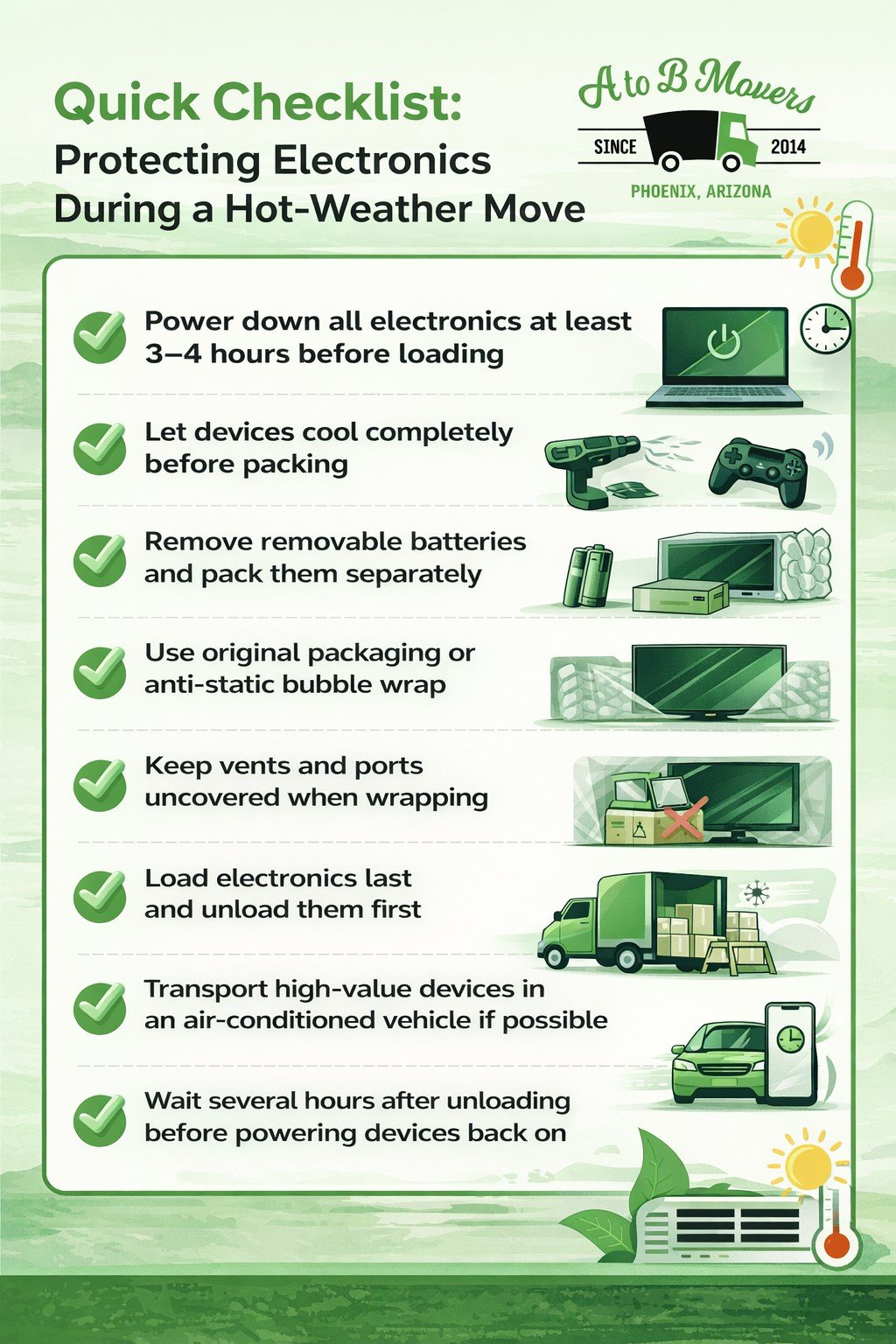
Shut everything down several hours ahead of time. Let devices cool completely. This reduces internal pressure and gives batteries time to stabilize.
If you’ve been using something heavily, like a work laptop or desktop computer, give it extra time. Heat on top of heat compounds problems.
Remove Batteries When You Can
This step gets skipped a lot. Mostly because it’s inconvenient.
But removable batteries are one of the biggest risk factors in high heat. They swell. They leak. Sometimes they fail quietly. Sometimes not.
If a device allows battery removal, do it. Pack batteries separately in insulated containers and keep them with you rather than in the truck.
Phones, unfortunately, don’t give you that option. Which is why phones should never spend hours in a parked moving vehicle.
Original Packaging Is Not Overkill
If you still have the original box and foam inserts for a TV, monitor, or desktop, use them. They’re designed to absorb shock and regulate airflow better than improvised padding.
If not, anti-static bubble wrap is your next best option. Avoid blankets directly against vents or ports. Electronics still need to breathe, even when they’re off.
And no, wrapping something “extra tight” doesn’t help. It traps heat.
Load Electronics Last. Unload Them First
This one sounds simple. It’s also one of the most effective things you can do.
Electronics should be among the last items loaded and the first unloaded. That reduces the amount of time they sit in extreme temperatures.
If you’re moving locally, consider transporting critical electronics in your personal vehicle with the air conditioning running. It’s not always convenient, but it’s far cheaper than replacing a workstation.
This is especially relevant during peak moving months. As we explain in why July is the new January for life resets, summer moves are often rushed. Electronics suffer most when timelines compress.
Avoid Storage When Possible
Short-term storage and electronics do not mix well in hot climates.
Even climate-controlled units can experience temperature spikes during loading, unloading, and power interruptions. If electronics must go into storage, confirm actual temperature ranges and humidity control, not just marketing language.
For longer relocations, many people coordinate delivery timing carefully to avoid storage altogether. Property managers often do this behind the scenes for tenants. For example, teams like Chandler Property Management frequently plan move-in and move-out timelines to reduce unnecessary storage exposure, especially during extreme heat periods.
That kind of coordination matters more than it looks from the outside.
Humidity Matters Too
Heat gets most of the attention, but humidity does damage quietly.
Moving from an air-conditioned home into hot, humid air can cause condensation inside devices. That moisture leads to corrosion and short circuits later.
Seal electronics in anti-static bags or plastic wrap before moving them into the heat. Let them acclimate slowly once inside the new space before powering them back on. A few hours can make the difference.
Don’t Turn Everything On Immediately
This is another common mistake.
After unloading, give electronics time to adjust to indoor temperature and humidity. Turning devices on while internal condensation is still present increases the risk of failure.
Waiting feels unnecessary. Until it isn’t.
If you’re unsure how long to wait, err on the side of caution. Electronics rarely punish patience. They absolutely punish impatience.
Why Renters and Landlords Both Care About This
Electronics damage isn’t just a homeowner’s issue. Renters lose security deposits over damaged smart thermostats, wall-mounted TVs, and built-in systems. Landlords deal with turnover delays when tech fails during move-outs.
That’s why relocation planning increasingly includes electronics protection. This article on how to attract relocating renters to your Manteca rental property highlights how smooth transitions and asset protection influence tenant satisfaction. The same principles apply anywhere. Moves that go well tend to be the ones where fewer things break.
Plan for the Heat You Can’t Control
No moving plan is perfect. Trucks get delayed. Traffic builds. Temperatures spike.
The goal isn’t eliminating risk. It’s reducing exposure.
This broader guide on protecting your belongings from Arizona’s extreme heat during a move covers additional strategies that apply beyond electronics, but the core idea is the same. Heat changes the rules. Planning has to change with it.
Final Thoughts
Protecting electronics during a hot-weather move isn’t about fancy gear or extreme precautions. It’s about understanding how heat behaves and adjusting your timeline accordingly.
Power down early. Pack smart. Limit exposure. Wait before rebooting.
At A to B Movers, we’ve seen what happens when electronics are rushed and what happens when they’re handled intentionally. We plan moves around heat because we’ve learned, sometimes the hard way, that timing matters as much as muscle. When you’re ready to move in summer conditions, we’re here to help you protect the things that matter most, without adding stress to an already busy day.
Quick Checklist: Protecting Electronics During a Hot-Weather Move